Node API Auth: open, admin, and strict
How a node is locked down: the three apiMode tiers, the X-PN-Api-Key header, the separate update key, and the 15-second button hold that clears both.
Published 2026-09-09 · Updated 2026-09-21 · All documentation →
A node serves its local API over plain HTTP. Use an API key to restrict writes, and keep the device on a trusted, restricted network: the key does not encrypt traffic or protect raw printing on port 9100. Firmware uploads use a separate update key.
Check the current mode
Read GET /config and check apiMode before integrating. The default is open, but an
installer may already have set a key and changed the mode. Obtain an existing key through
your installer's secure handoff; the read response does not reveal it. Firmware replacement
is refused until an update key is configured, even when ordinary API writes are open.
The three tiers
A node’s apiMode is open, admin, or strict, reported on its config and set through a
config write. Read a tier as the weakest mode at which a route starts asking for a credential.
| tier | what it gates | why the line is there |
|---|---|---|
| — | read routes remain unauthenticated | Reads aid diagnosis, but can expose operational data such as barcode scans and captured traffic. Credential fields report whether a key is set rather than returning it. Keep the node on a trusted, restricted LAN |
admin | the config and lifecycle class — what this node is, which network it is on, where it sends events, what firmware it runs, whether it is running at all | This is the class an operator locks to stop a well-meaning tablet re-pointing a node |
strict | the operational class — printing, the drawer, raw bytes, composed jobs, and mutations of the diagnostic ring and scan log | Left open in admin on purpose. Gating printing at admin would mean the setting somebody turns on to protect their configuration also stops their receipts, and a control with that failure mode is switched off again within a shift |
A refusal is 401 api_locked. See the error vocabulary for how it sits beside
the rest.
One header, and it is not Authorization
The credential is X-PN-Api-Key: <key>.
curl -X PUT http://proxynodes-pn-7f3a.local/config \
  -H 'X-PN-Api-Key: <key>' \
  -H 'Content-Type: application/json' \
  -d '{"printWidthCols": 48}'
It is deliberately not a bearer token, and that is worth understanding rather than working around.
Authorization: Bearer already carries the update key on this API, and a node in admin needs
both credentials on a single firmware-settings request: the API key to reach the route at all,
and the update key to replace the update key. Two secrets cannot share one header without each
quietly becoming a valid substitute for the other.
Setting a key, and replacing one
The key is written through the same config route that carries every other setting, as a write-only field beside a read-only "is one set" flag.
- A key is at least 16 characters, and an over-length one is refused rather than truncated. A truncated credential is byte-for-byte indistinguishable from a working one until the far end starts rejecting things.
- Setting the FIRST key is ungated bootstrap. Replacing a stored one takes the current key, in
every mode including
open. That closes the window between "the operator set a key" and "the operator turned the mode up", during which a stranger could otherwise overwrite it. - A mode above
openrequires a key, counting one arriving in the same request. Asking foradminon a keyless node is refused rather than accepted as a lock nothing can satisfy. - An empty key clears it, and clearing while the mode is above
openis refused unless the same request reopens the node. Presence, not truthiness, decides whether a field applies.
The honest consequence: the node’s own page stops being able to save
A node serves its own operator page over plain HTTP on a LAN address, and that page has nowhere to
hold a credential that would not simply be readable by whoever loaded it. So on a node above
open, every save from that page is refused.
It still reads everything — status, config, network, firmware state and the diagnostic ring are all
ungated — so the page remains the diagnostic it mostly is. Configuration on a locked node is a
curl with the header, tooling with the key in its environment, or your own software. If that
trade is wrong for a site, the answer is open, which is where every node starts.
Firmware is a separate credential
Uploading a firmware image is gated by a bearer key in every mode, including open, and a node
with no update key set refuses firmware from everyone. Closed by default, not open — the opposite
default would ship every node wide open until somebody remembered to lock it.
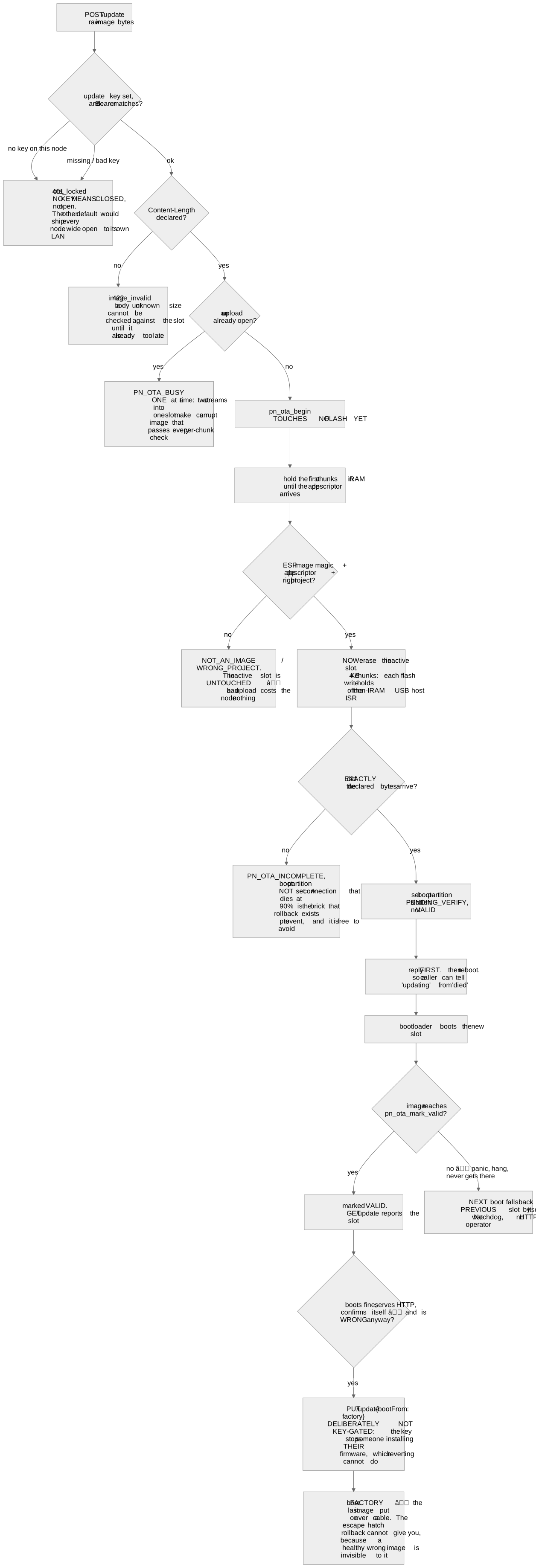
Reverting to the factory image is not gated the same way, and that asymmetry is a decision:
- The key exists to stop somebody putting their firmware on your node. Uploading an image can do that. Reverting to the partition its owner last flashed over a cable cannot.
- Requiring the key there would mean the one command that rescues a bad update is unavailable to anyone who has lost it — the same trap as a fire door that locks.
At admin, a request whose only instruction is "boot the factory image" stays open; anything
carrying another field alongside it takes the admin credential like every other write. At strict
it closes too, and what makes that defensible is the paragraph below.
Lost the key
Hold the B button for 15 seconds while the firmware is running. The node erases the API key and
the update key, returns the mode to open, and reboots. It does not clear the Wi-Fi settings or
cloud token, and does not release account ownership. Handle those separately before transferring a node.
That gesture is separate from, and longer than, the ~5-second hold that forgets the Wi-Fi credentials, and the two are separated by dead space so a mistimed press cannot land on the other one. It needs physical possession of the node, which is the only credential left when both of the others are gone.
What this model does not give you
There is no per-caller identity, no scopes, no audit trail of who called what, and no rotation schedule — one key per node, held by whoever is configuring it. Raw ESC/POS on port 9100 is outside all of it and cannot be inside it: that socket carries printer bytes and has no header, handshake or envelope anywhere in the protocol to put a credential in, so it is protected by network segregation or it is not protected. Plan the segment, not the header.
What to tell your evaluators
If you are an ISV putting this in front of a security review, the shape is: a LAN device with an optional shared secret, closed-by-default firmware replacement, a physical reset that needs possession, no inbound path from the internet at all, and no remote access — there is none, and none is planned. The API overview covers what the surface actually is, and webhooks covers the one direction a node initiates traffic on your network.
Frequently asked questions
- Does a locked node still print?
- At `admin`, yes — printing, the drawer and raw bytes stay open there on purpose. At `strict` they need the header too. That is the whole reason `admin` exists as a middle tier rather than a boolean.
- Can the website configure my node for me?
- No, and it could not be built. This site is served over https and a node is plain http on a private address; browsers block an https page from reading one. The site can hand you a link you click, which navigates your browser to the node — that works and is what the account page does — but it never reads or writes a node itself.
- Is the API key sent in the clear?
- On a plain-http LAN connection, yes. A till on a shop network has no certificate and refusing plain http would mean the feature only worked in deployments this product exists not to require. Treat the key as protection against casual misuse on a segment you control, not as transport security.
- What happens to the key when I update the firmware?
- It survives. Credentials live in non-volatile storage rather than in the image, so an update — pushed over the LAN or pulled unattended — leaves the mode and both keys where they were. The 15-second button hold is the only thing that clears them.
- Can I set different keys for different parts of the API?
- No. There is one key per node and the tiers decide which routes ask for it. If you need per-caller identity, put the node behind your own service and let that service hold the key.
Still stuck? Contact support with your node model, firmware version, and what happened. Include an error code if you have one.
Related reading
- The Node HTTP API: Scope, Auth, and LimitsPrint a receipt, read status and handle errors with the local HTTP API. Includes curl examples, authentication and network requirements.
- Node API Error Codes and Retry AdviceLook up local API errors and recovery steps. Learn when to retry and when a print may already have reached the printer.
- Node Webhooks: Push Events to Your POSReceive local device events over HTTP, verify their HMAC signature and handle delivery failures.